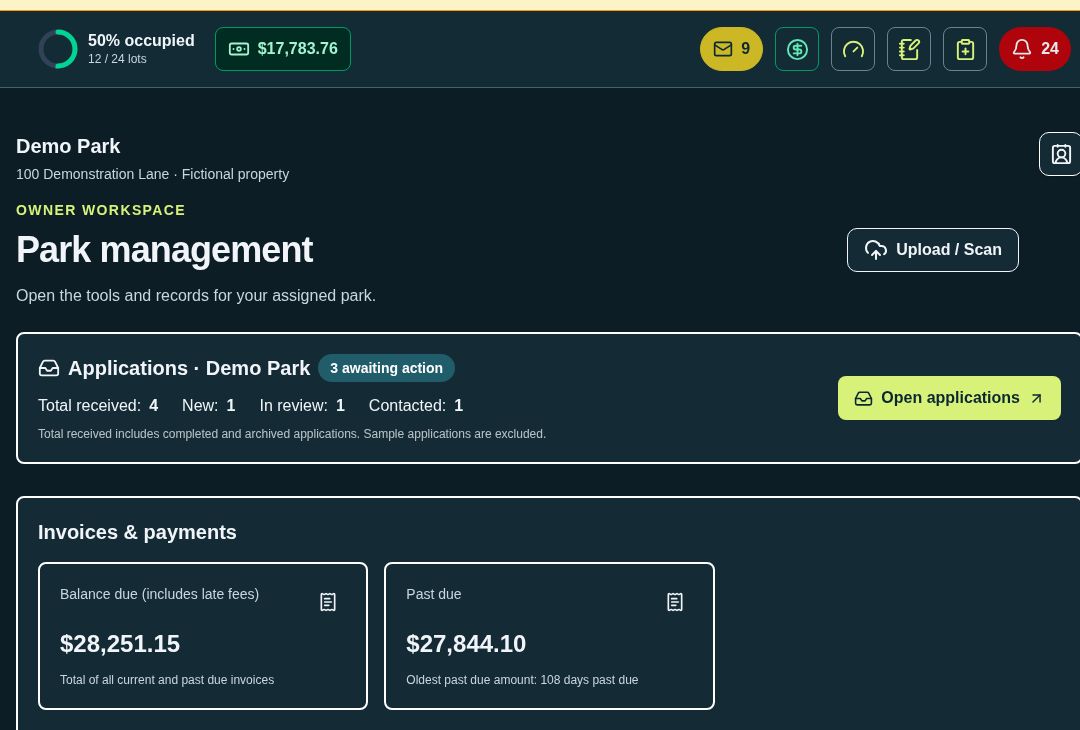
See occupancy, applications awaiting action, balances and tasks. Open the underlying records from the dashboard.
RV park management · Connected by designYour park.
Your park.
Your people.
All together.
From the first application to the month-end books, ParkWyze keeps the daily work of running an RV park in one connected place.
Built around real park work.Residents. Guests. Utilities. Finances.
Computer, tablet & phoneModules for each part of your operationAccess by role & property
01 / The daily pictureKnow what needs
Know what needs
your attention.
One dashboard brings applications, balances, payments and staff work into view. Quick actions keep common jobs close. Urgent indicators help the right person see the next step before it gets buried.
Owner, manager, staff, tenant and guest experiences follow the work each person needs to do.
Move between an agreement, its charges, receipts and retained documents without assembling the story from separate spreadsheets.
02 / Your operating toolkitOne park.
One park.
Many moving parts.
Explore the modules behind the daily work. Enable tools by property and give each team member appropriate access.
Module descriptions reflect the current product and its developing workspaces. Features marked “In development” are not presented as completed. Provider connections, payment processing and accounting imports depend on setup and service availability.
03 / A look insideActual screens.
Actual screens.
Everyday work.
These screenshots come from the application’s fictional Demo Park. Click a screen to take a closer look.
Application screenshot · Fictional Demo Park · October 2026
04 / Connected from start to finishA smoother journey.
01 02 03 04 Your processes already have a rhythm.
A smoother journey.
For the park and the person.
Apply or reserve
Start with a long-term application or a daily or weekly reservation. Keep the details with the person’s record.
Prepare & sign
Prepare agreements and retain signed documents with the resident record. Residents use their private tenant portal; short-term guests use a private guest link to complete registration without creating an account.
Run the stay
Manage charges, utility readings, store purchases and tasks. Checked-in guests can see access information and request an extension.
Review the books
Bring activity into BooksWyze for owner review, tax reporting and a reviewed bookkeeping export.
Your processes already have a rhythm.
The software should fit.
ParkWyze organizes daily actions above specialized modules, with property settings and role-based access underneath. Start a conversation about your park, your team and the workflows you want to simplify.
Access follows responsibilityOne operation.
One operation.
A view for each role.
Property assignments and permissions shape each workspace. A resident or guest sees their own portal, while the office works from its management view.
Owners
Review property performance, financial activity and decisions requiring Owner approval.
Managers & staff
Work on assigned properties, guest and resident records, daily tasks and permitted modules.
Residents
Use a private tenant portal for their information, documents and available account actions.
Guests
Use a private reservation link for registration, stay details, access information and extension requests.
Getting started
Set up the park before the busy day.
- Define the property. Add sites, rates, branding and property settings.
- Assign the team. Choose roles, property access and modules.
- Review the workflow. Confirm billing inputs, documents and provider connections with your team.
A few practical questions
Good to know.
Can I see a demo without creating an account?
Yes. The guided demo on this website opens without an account and uses fictional sample data. You can browse screens, filter sample charges, try a store cart and preview owner selection. It does not create real records or charge payments. For a hands-on session in the full application, email info@parkwyze.online.
Does every employee see every record?
No. ParkWyze uses property assignments and roles to control access. Owners, managers, staff, tenants and guests have different workspaces. The management app remains protected separately from this website and guided tour.
What does the QuickBooks Online feature do?
BooksWyze prepares reviewed journal CSV files using approved records and account mappings. Owner review and approval come before export. It does not automatically post transactions to QuickBooks. Your bookkeeper should review the actual account mappings and import process.
Does ParkWyze process card payments?
Payment connections depend on the property’s setup. The current POS can record payments approved on an external terminal; that entry does not itself charge a card. We will discuss your processor and requirements during a demo.
Can one team work across multiple properties?
Yes. ParkWyze organizes work by property, with property assignments and role-based access. Each property can keep its own settings, logo and operating records. Your team’s permissions determine which properties and modules each person can open.
What happens when a reservation deposit is overdue?
The authorized deposit updater checks pending reservations against the required 24-hour deposit deadline. When the required deposit has not been recorded, it cancels the pending reservation and releases the held site. Existing payments are preserved; partial payments open Owner refund review. The updater does not collect payments or issue refunds.
What does WyzeAI help with?
WyzeAI brings AI assistance into the park workspace, with OpenAI API support. Treat generated content as a draft and review it before relying on it for resident communication, property records or decisions.
What should I bring to a walkthrough?
A list of sites and stay types, your current rates and utility billing approach, the roles on your team, and the daily jobs you want to simplify. Use sample information for the initial conversation; you do not need to email resident records.
Does the software guarantee legal compliance?
Compliance and notice workflows organize information, required actions and retained evidence. They support management review; they do not replace legal advice or determine every jurisdictional question automatically.
Let’s talk about your parkPut ParkWyze
Put ParkWyze
to work for you.
Questions, a walkthrough, or a closer look at a module?